Shopify Payments now takes OXXO in Mexico. How to turn it on and run the orders
By José Antonio Mijares | 2026-10-27 | 5 min read
Stores in Mexico can now offer cash payment at OXXO through Shopify Payments, without a third-party app. Who qualifies, the limits, what happens to an order while the customer has 5 days to pay, and how to handle refunds.
Shopify Payments in Mexico now lists OXXO as a payment method. A customer checks out, gets a barcode, and pays cash at any OXXO store. Until now, a Shopify store that wanted OXXO needed a third-party gateway app.
For a store selling in Mexico, that's one less app between the customer and the order. It also brings a kind of order most Shopify stores haven't had to run before: one that exists for days before anyone has paid for it.
Everything below comes from Shopify's Help Center as of October 2026. Shopify hasn't published a launch date we could find, or a separate OXXO fee, so check the rate in your own payments settings.
Who can turn it on
Shopify lists three conditions:
- The store is located in Mexico and uses a Shopify Payments Mexico account.
- Identity verification is complete.
- The store's business category is eligible for OXXO.
And three for the customer's order:
- The customer pays in Mexican pesos. If they check out in another currency, such as US dollars, the payment fails.
- The customer is in Mexico.
- The amount paid at OXXO is between 10 and 10,000 MXN. If part of the order is paid another way, such as with a gift card, the limit applies to the part left for OXXO.
OXXO doesn't work for Shop Pay Installments, Shopify POS, in-person sales or subscriptions.
How to turn it on
In your Shopify admin, go to Settings → Payments. On Shopify Payments, click Manage, then More actions → Manage payment methods. Under Local payment methods, select OXXO and enable it.
If you also run a third-party OXXO app, decide which one stays. Two OXXO options at checkout confuse the customer.
What happens to the order
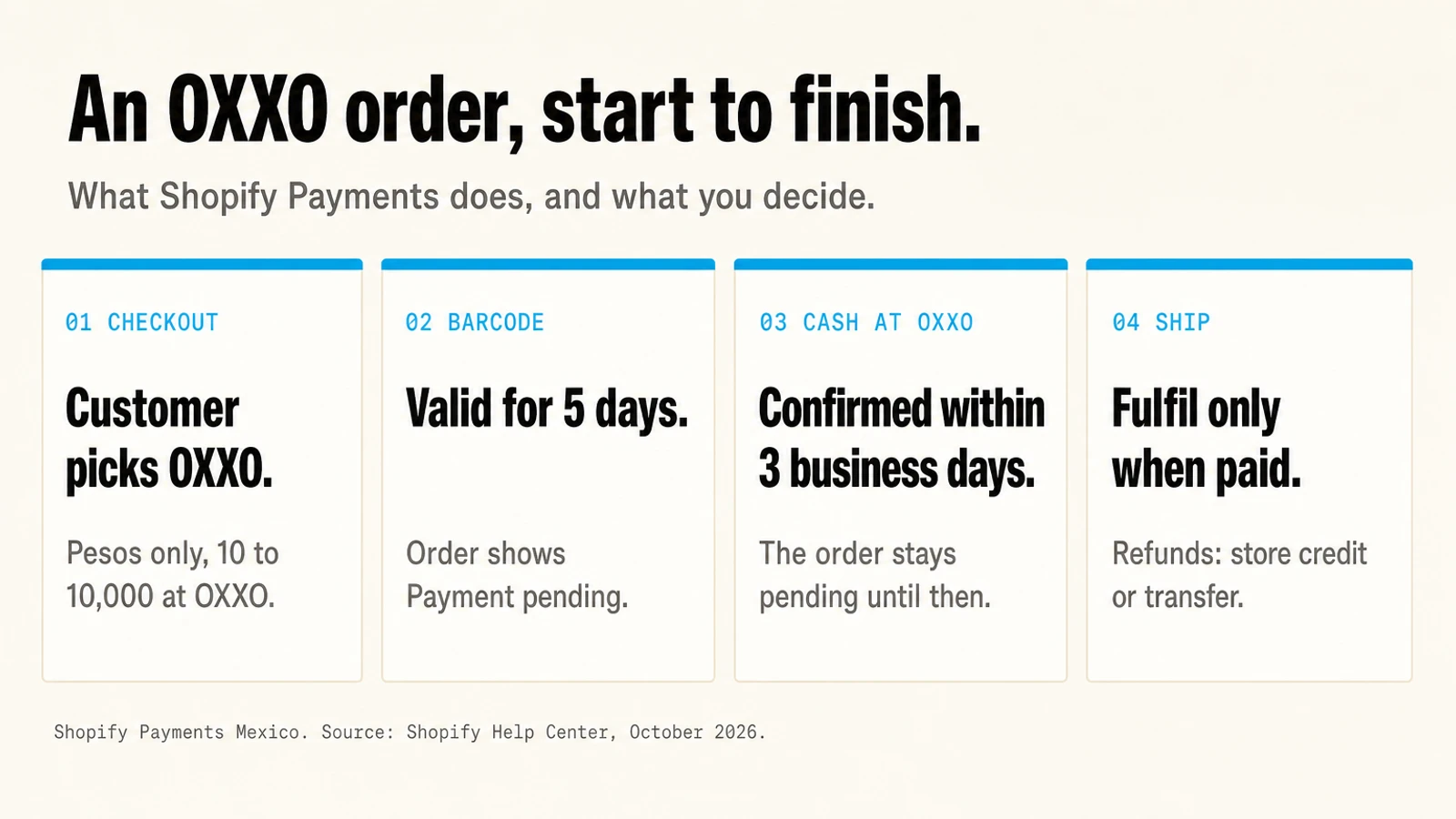
- Checkout. The customer picks OXXO and gets a barcode. Shopify creates the order right away with the status Payment pending.
- Five days to pay. The barcode is valid for 5 days after the order is placed.
- Cash at OXXO. The customer pays at the store. Confirmation can take up to 3 business days after that, and the order moves to paid once it arrives.
- A late-payment window. After the barcode expires, the order stays Payment pending for up to 3 more business days, so a payment made near the deadline can still land. Those days follow the Mexican calendar: weekends and Mexican public holidays don't count.
In the worst case, an order can sit unpaid for over a week. Plan for that.
Five things to set up before you switch it on
These are our recommendations, not Shopify's rules.
1. Don't ship on "order placed". Fulfil when the payment status is Paid. If your warehouse, 3PL or an app starts work on every new order, change its trigger to "order paid".
2. Watch the pending list. Filter orders by payment status Pending once a day. A customer who hasn't paid on day 3 still can. One on day 9 almost certainly won't.
3. Don't cancel early. Wait out the 5 days plus the 3-business-day window before you cancel an unpaid order. Cancel inside it and a customer who paid on time has paid for nothing.
4. Write the refund rule down. Shopify Payments can't refund an OXXO payment back to the customer. Your choices are store credit, which Shopify can issue as a refund method, or a bank transfer you make outside Shopify. A transfer isn't recorded in Shopify on its own, and a note doesn't mark the order as refunded, so record the refund on the order in Shopify after you send it. Put the rule in your refund policy before the first OXXO customer asks.
5. Check partly paid orders. If a customer paid part of an order another way, for example with a gift card, and never paid the OXXO part, the order stays open with that payment applied and its stock reserved. Review those by hand.
Should you turn it on?
If you sell in Mexico, probably yes. OXXO is a common way to pay for an online order in Mexico without a card. Test it the way you'd test any checkout change: compare checkout completion and the share of OXXO orders that get paid for a month before and after. If many OXXO orders never get paid, the barcode instructions and the reminders you send are the first things to look at.
Saying you accept OXXO also matters outside checkout. A shopper who wants to pay cash checks before buying, and answer engines repeat what your pages say. Ezeo covers how to make Google and AI assistants know you accept OXXO.
Jamak builds and tunes Shopify stores for Mexico and the US, checkout included. See our Shopify work.
Frequently Asked Questions
Q: Does Shopify Payments accept OXXO?
Yes, for stores in Mexico with a Shopify Payments Mexico account, identity verification complete and an eligible business category. The customer pays in cash at an OXXO store, in Mexican pesos, and the amount paid at OXXO must be from 10 to 10,000 MXN.
Q: How long does a customer have to pay at OXXO?
The barcode is valid for 5 days after the order is placed. The order then stays Payment pending for up to 3 more business days, counted on the Mexican calendar, so a payment made near the deadline can still be confirmed.
Q: How do I refund an OXXO order on Shopify?
Shopify Payments can't refund an OXXO payment to the original method. Issue store credit as the refund method, or send a bank transfer outside Shopify and then record the refund on the order, because Shopify won't record the transfer on its own.
Q: Does OXXO work with Shopify POS or subscriptions?
No. Shopify lists OXXO as unavailable for Shopify POS, in-person payments, subscriptions and Shop Pay Installments.