Claude can now join your Google Meet calls: how Claude Meetings works, and what to set up first
By José Antonio Mijares | 2026-11-13 | 7 min read
Anthropic opened Claude Meetings in beta on November 12, 2026. Claude joins a Google Meet call as a participant, answers questions, takes the notes and builds docs and whiteboards while you talk. How to add it, what it costs, and the four settings to decide before it joins a client call.
Yes, Claude can now sit in your meetings. Anthropic opened Claude Meetings in beta on November 12, 2026: you add Claude to a Google Meet call, it joins as a visible participant, follows the conversation, answers questions, and builds docs, whiteboards and other artifacts while the team keeps talking. When the call ends, the notes, action items, transcript and everything it made are on one page in Claude.
It's rolling out to Team and Enterprise plans, and Google Meet is the only platform for now. Anthropic says other video platforms are coming.
Everything below comes from Anthropic's announcement and the Help Center guide, both from November 12, 2026. It's a beta, so check them before you rely on a detail.
What Claude does in the call
It answers. Say "Claude" and ask, or type in the Meet chat. By default it answers in writing in the chat, so everyone on the call can read it.
It builds while you talk. "Claude, make a doc" or "Claude, make a whiteboard." Teammates on the invite can edit what it made during the call. Anthropic's example is planning a customer event: Claude starts the plan doc from what was said so far, looks up last year's cost when someone asks, and puts the timeline on a whiteboard.
It uses your tools, with permission. It can use each person's connected tools, like sending a Slack message, but only that person's, and only after they say yes the first time. When someone asks out loud, it confirms who's speaking every time for now.
It takes the notes. After the call, the meeting page has a summary, action items, the transcript and every artifact. People from your organization on the invite get a recap email. Later you can ask Claude about past meetings in a normal chat.
What it keeps. A transcript, a summary and descriptions of what was on screen. Not audio.
It can stay up to eight hours, and you can pause it or remove it from the meeting page.
How to add Claude to a Google Meet call
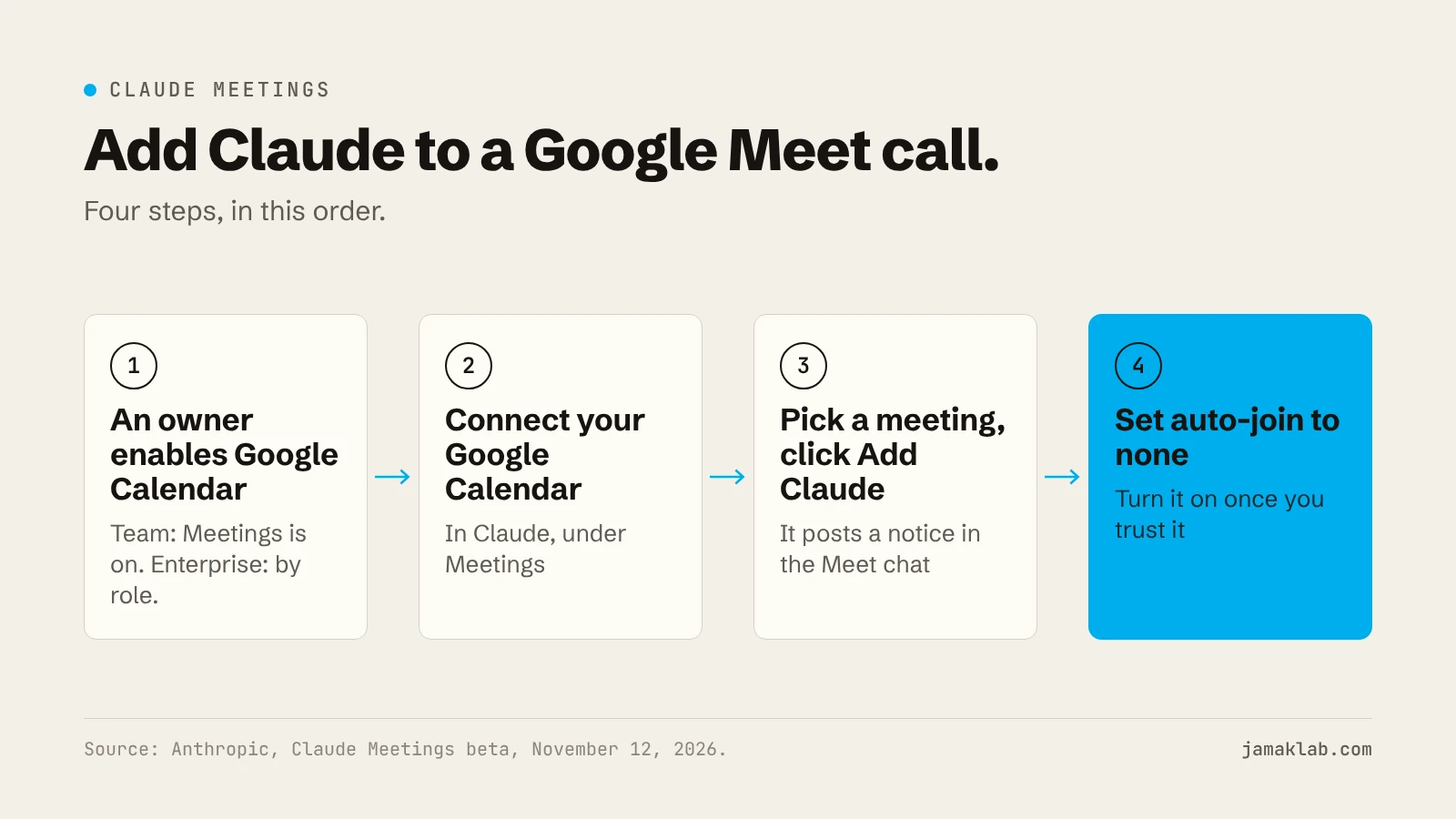
- Have an owner enable Google Calendar for your organization. On Team plans, Meetings is on by default; on Enterprise, an owner turns it on for everyone or for specific roles.
- Go to Meetings in Claude and connect your Google Calendar.
- Pick a meeting and click "Add Claude." Claude posts a notice and a link to the meeting page in the Meet chat when it joins.
- Decide on auto-join in Settings > Capabilities > Meetings: all your meetings, all except one-on-ones, or none. Start with none.
Not every organization gets it during the beta: Anthropic excludes accounts with zero data retention, a HIPAA-ready configuration or customer-managed encryption keys.
What it costs
During the beta, notes, transcripts and answers are included on Team and Enterprise plans. An answer that uses one of your connected tools counts toward your plan's usage. Docs, whiteboards and other artifacts made in a call are free through February 10, 2027. Anthropic hasn't said what they cost after that.
Four settings to decide before a client call
1. Consent first. Anthropic's own instruction is to make sure everyone on the call is OK with being transcribed before you add Claude or turn on auto-join. Put one line in the invite.
2. Outside guests. This is the setting that matters for an agency. Claude can stay out of calls with people from outside your organization, and leave if one joins partway through, another company's notetaker bot included. On Enterprise that's the default; the Help Center says Team plans allow outside guests by default, so check yours. When guests are allowed, Claude takes notes and posts its notice, but doesn't reply in the call's chat, and guests don't get the meeting page or the recap.
3. Members' connectors. An owner decides whether Claude can use members' connected tools during meetings. If your team's Claude has Gmail, Slack or a CRM connected, decide this on purpose.
4. The chat is public to the call. Anything Claude posts in the Meet chat, everyone on the call sees. The chat on the meeting page stays inside your organization. Ask for internal numbers there, not out loud.
| Setting | What happens | Decide before the call |
|---|---|---|
| Consent | Claude transcribes everyone on the call | Put one line in the invite |
| Outside guests | Enterprise keeps Claude out by default; the Help Center says Team allows guests | Check your plan's setting before a client call |
| Members' connectors | Claude can use each person's tools, after their yes | An owner turns them on or off for meetings |
| The Meet chat | Everyone on the call sees what Claude posts | Ask for internal numbers on the meeting page |
Where it fits, and where it doesn't yet
Use it first on internal calls with a clear output: a weekly planning meeting that ends in a doc, a project kickoff that ends in a timeline, a retro that ends in action items. That's where "it builds while we talk" saves the hour after the call.
Leave it out of calls where the notes are the sensitive part, until you've read a few of its summaries next to your own. And if your clients are on Zoom or Microsoft Teams, it can't join them yet.
Anthropic says it's working with Gong, Attention, Granola, Fireflies.ai, Otter and Plaud so you can send a meeting's transcript to the tools your team already uses. That's announced, not live. For now Anthropic also describes Claude as waiting to be asked rather than jumping in.
If you're deciding where an agent like this belongs in your company, the same questions apply as with any other: one workflow, one owner, one number. We wrote them down in how to pick an AI pilot that reaches production, and the parts every agent needs around it in the harness, not the model.
Frequently Asked Questions
Q: What is Claude Meetings?
A beta feature from Anthropic, announced November 12, 2026, that adds Claude to a Google Meet call as a visible participant. It answers questions, takes the notes and builds docs, whiteboards and other artifacts during the call, and keeps everything on a meeting page in Claude.
Q: Which plans include Claude Meetings?
Team and Enterprise plans, rolling out in beta. On Team it's on by default; on Enterprise an owner turns it on. Organizations with zero data retention, a HIPAA-ready configuration or customer-managed encryption keys don't get it during the beta.
Q: Does Claude Meetings work with Zoom or Microsoft Teams?
Not yet. It supports Google Meet at launch, and Anthropic says other video platforms are coming soon.
Q: Does Claude record the audio of my meeting?
No. It saves a transcript, a summary and descriptions of what was on screen, not audio. It shows up as a participant and posts a notice in the call's chat when it joins.
Q: How much does Claude Meetings cost?
During the beta, notes, transcripts and answers are included on Team and Enterprise plans, except answers that use a connected tool, which count toward your plan's usage. Docs and whiteboards made in a call are free through February 10, 2027.